
Technology & Automation
Using QuickBooks for Rental Property Management
by Platuni | 15 Jan, 2026 | 10 mins read
Platuni
15 January, 2026
10 mins read

Managing rental properties requires more than collecting rent and paying bills. Landlords must track income, categorize expenses, prepare for taxes, monitor cash flow, and understand which properties are profitable. Without reliable accounting, even successful rental portfolios can suffer from poor financial decisions. That is why many landlords turn to rental property QuickBooks to organize their finances in a professional and scalable way.
QuickBooks is one of the most widely used accounting platforms for small businesses and property owners. While it is not a property management system, it excels at bookkeeping, reporting, and tax preparation. When set up correctly, rental property QuickBooks helps landlords separate personal and business finances, track income by property, monitor expenses, and generate reports that reveal true profitability.
This guide explains how QuickBooks works for rental property owners, what features matter most, how to set it up for rentals, and how much it costs. If you want accurate records, better financial visibility, and stress-free tax seasons, understanding rental property QuickBooks is essential.
Also Read: How AI Is Changing Property Management
QuickBooks and How It Helps Rental Property Owners

QuickBooks is accounting software designed to track income, expenses, assets, liabilities, and taxes. It automates bookkeeping tasks such as transaction categorization, invoicing, and reporting. For landlords, rental property QuickBooks becomes the central system for managing financial data across one or multiple properties.
Unlike spreadsheets, QuickBooks provides structure and automation. Bank transactions sync automatically, recurring payments can be scheduled, and reports update in real time. This allows landlords to move from reactive bookkeeping to proactive financial management.
With rental property QuickBooks, you can:
- Track rent payments by tenant or property
- Categorize maintenance, repairs, insurance, and utilities
- Separate personal and business expenses
- Monitor cash flow and profitability
- Generate tax-ready financial reports
While QuickBooks does not handle leasing, maintenance requests, or tenant communication, it remains one of the strongest tools for rental accounting.
Setting Up Rental Property QuickBooks Correctly
To get accurate results, QuickBooks must be configured specifically for rental operations.
#1. Chart of Accounts for Rental Properties
A proper chart of accounts is the foundation of rental property QuickBooks. Typical accounts include:
Income Accounts
- Rental Income
- Late Fees
- Application Fees
- Other Property Income
Expense Accounts
- Repairs and Maintenance
- Utilities
- Property Management Fees
- Advertising and Marketing
- Insurance
- Property Taxes
- Mortgage Interest
- Professional Fees
Asset Accounts
- Property Value
- Security Deposits Held
- Equipment and Fixtures
This structure allows you to see exactly where money is coming from and where it is being spent.
Also Read: 5 Automation Tools Every Property Manager Should Know
#2. Tracking Multiple Properties
QuickBooks Online allows tracking by Classes or Locations (available in Plus and Advanced plans). Each property can be assigned its own class, making it possible to run profit and loss reports by property. This feature is essential for landlords managing multiple units.
#3. Bank and Credit Card Integration
With rental property QuickBooks, bank accounts and credit cards can be connected directly. Transactions import automatically, reducing manual entry and minimizing errors.
Core Features of Rental Property QuickBooks
#1. Income and Expense Tracking
QuickBooks categorizes transactions automatically based on rules you set. Rent payments, maintenance costs, utilities, and insurance premiums are logged in real time. This ensures accurate records for budgeting and tax reporting. For landlords, rental property QuickBooks makes it easy to identify high-cost properties and control spending
#2. Rent Invoicing and Payment Recording
QuickBooks allows you to create invoices for tenants and record rent payments. While it does not replace tenant portals, it provides structured records of who paid, how much, and when. You can also mark late payments and track outstanding balances, keeping your receivables organized.
#3. Financial Reports and Profit Analysis
One of the strongest features of rental property QuickBooks is reporting. You can generate:
- Profit and Loss statements
- Cash Flow reports
- Balance Sheets
- Expense summaries by category
- Income by property (using Classes or Locations)
These reports help landlords evaluate performance, plan upgrades, and make investment decisions based on data rather than guesswork.
Also Read: Landlord Bookkeeping Software: How to Track Rental Income and Expenses
#4. Tax Preparation and Compliance
QuickBooks simplifies tax season by organizing deductible expenses and generating financial summaries. Common deductible rental expenses include repairs, mortgage interest, insurance, advertising, and professional fees.
You can export reports directly to your accountant or use them for filing. This reduces the risk of missed deductions or inaccurate filings.
#5. Mileage and Expense Tracking
For landlords who travel between properties, QuickBooks allows tracking of business mileage and categorization of vehicle expenses. This feature helps maximize legitimate tax deductions.
#6. Automation and Recurring Transactions
Recurring rent, mortgage payments, and utilities can be scheduled in rental property QuickBooks. Automation ensures consistency and prevents forgotten entries.
QuickBooks Versions for Rental Property Management
QuickBooks offers multiple products, but the most relevant for landlords is QuickBooks Online. Desktop versions are no longer sold to new users.
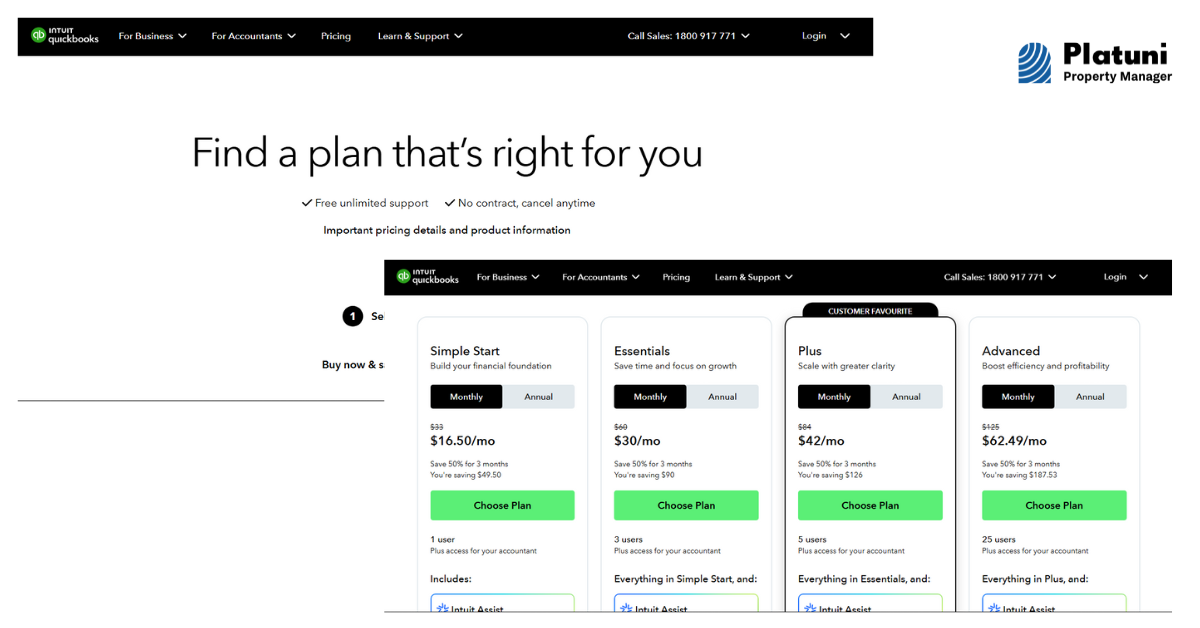
Prices are standard monthly rates and may vary with promotions or regional taxes. For most landlords, QuickBooks Online Plus is the best choice because it supports Class and Location tracking, which is critical for monitoring individual property performance in rental property QuickBooks.
Strengths of Using Rental Property QuickBooks
#1. Accurate Financial Visibility
QuickBooks provides real-time insight into income, expenses, and cash flow. You can see which properties are profitable and which ones need cost control.
#2. Professional Record Keeping
Financial records are organized in an audit-friendly format. This is especially important for taxes, refinancing, or selling property.
#3. Scalability
As your portfolio grows, rental property QuickBooks scales with you. Additional properties, accounts, and users can be added without changing systems.
#4. Integration with Banks and Payment Tools
Direct bank feeds reduce manual data entry and minimize bookkeeping errors.
Limitations of Rental Property QuickBooks
While rental property QuickBooks is powerful, it is not a full property management system. It does not handle:
- Lease management
- Maintenance requests
- Tenant communication
- Vacancy advertising
- Tenant screening
This means landlords often use QuickBooks alongside other tools for operations. QuickBooks focuses on accounting, not daily property management
Also Read: 3 Daily Tasks You Can Automate to Save 10 Hours a Week
Best Practices for Using Rental Property QuickBooks
#1. Separate Personal and Business Accounts
Always use a dedicated business bank account for rental income and expenses. This ensures clean records and simplifies tax reporting.
#2. Use Classes or Locations for Each Property
This allows accurate profit and loss tracking per property, which is essential for portfolio analysis.
#3. Reconcile Accounts Monthly
Bank reconciliation ensures all transactions are recorded correctly and catches errors early.
#4. Attach Receipts and Documents
QuickBooks allows you to upload receipts and link them to transactions, keeping documentation organized for audits or tax filing.
#5. Review Reports Regularly
Monthly financial reviews help identify trends, rising costs, or underperforming properties before problems grow.
Rental property QuickBooks is ideal for landlords who want:
- Clear financial reporting
- Professional bookkeeping
- Simplified tax preparation
- Scalable accounting for multiple properties
It is especially valuable for self-managing landlords or small property management businesses that need reliable accounting without enterprise-level complexity. However, landlords looking for tenant portals, maintenance workflows, or marketing tools will need additional software alongside QuickBooks.
Conclusion:
QuickBooks remains one of the most trusted accounting platforms for rental property owners. With robust income tracking, expense categorization, financial reporting, and tax readiness, rental property QuickBooks gives landlords the clarity needed to manage rental finances confidently.
Rental property QuickBooks is ideal for landlords who want:
- Clear financial reporting
- Professional bookkeeping
- Simplified tax preparation
- Scalable accounting for multiple properties
It is especially valuable for self-managing landlords or small property management businesses that need reliable accounting without enterprise-level complexity. However, landlords looking for tenant portals, maintenance workflows, or marketing tools will need additional software alongside QuickBooks.
When configured correctly, it transforms scattered transactions into structured financial intelligence. For landlords focused on profitability, compliance, and long-term growth, rental property QuickBooks is not just a bookkeeping tool it is a strategic asset.
Also Read: How Renting Technology Helps You Fill Vacancies Faster
Frequently Asked Questions on QuickBooks
Can QuickBooks track multiple rental properties separately?
Yes. Using Class or Location tracking in QuickBooks Online Plus or Advanced, each property can be monitored individually with separate profit and loss reports.
Does rental property QuickBooks handle rent collection automatically?
QuickBooks can create invoices and record payments, but it does not function as a full rent collection or tenant portal system.
Which QuickBooks plan is best for landlords?
QuickBooks Online Plus is the best option for most landlords because it supports property-level tracking through Classes and Locations.
Is QuickBooks suitable for tax preparation for rental income?
Yes. It organizes deductible expenses, tracks income accurately, and generates reports that simplify tax filing and communication with accountants.
Stay Informed
Subscribe to the Platuni B2B Newsletter to receive industry insights,
new feature announcements, and exclusive growth reports
Related Posts

SEPTEMBER 21, 2026
How to Automate Rental Property Management: 10 Tasks Landlords Can Stop Doing Manually
Ten repetitive landlord tasks, rent reminders, payment checks, report building, that automation can take over while judgment calls stay with the landlord.
Learn more
SEPTEMBER 18, 2026
Leasing Automation Software for Property Managers: What It Automates & What It Costs (2026)
Which steps in the leasing workflow are actually worth automating, what that automation costs, and who it isn't worth it for.
Learn more