
Property Management & Operations
QuickBooks for Landlords: Setup and Best Practices
by Platuni | 29 Jan, 2026 | 10 mins read
Platuni
29 January, 2026
10 mins read

Managing rental property finances often requires balancing rental income, tax obligations, maintenance expenses, and long-term profitability, all while maintaining accurate records and regulatory compliance. For many landlords, transitioning from spreadsheets or paper-based systems to a structured accounting platform is not merely a convenience but a strategic improvement. QuickBooks provides a reliable solution for organizing financial data, improving reporting accuracy, and simplifying tax preparation. Whether managing a small number of properties or overseeing a growing portfolio, using QuickBooks effectively can enhance financial visibility, streamline operations, and support more informed business decisions.
In this guide, you’ll learn how to configure QuickBooks for landlords, understand its core features and limitations, explore best practices for property accounting, and see how tools like Platuni can extend its capabilities to support the entire rental workflow from bookkeeping to tenant documentation and compliance tracking.
Why Landlords Use QuickBooks
QuickBooks isn’t designed solely for landlords, yet it remains one of the most popular accounting tools for small businesses and rental property owners because of its robust bookkeeping features and widespread adoption among professionals.
According to landlord accounting resources, QuickBooks helps landlords:
- Track rental income and categorize expenses
- Separate personal and business finances
- Monitor cash flow and property profitability
- Generate tax-ready financial reports for accountants or tax preparers
- Manage multiple properties within one system using Classes or Locations
For landlords who want reliable financial visibility and professional bookkeeping, QuickBooks provides a solid foundation especially when compared to manual spreadsheets where errors and inconsistencies are common.
Getting Started: QuickBooks Setup for Landlords
Proper setup is crucial. A misconfigured QuickBooks file can lead to inaccurate reports and costly mistakes during tax season. Here’s how to build your rental accounting system.
1. Choose the Right Version
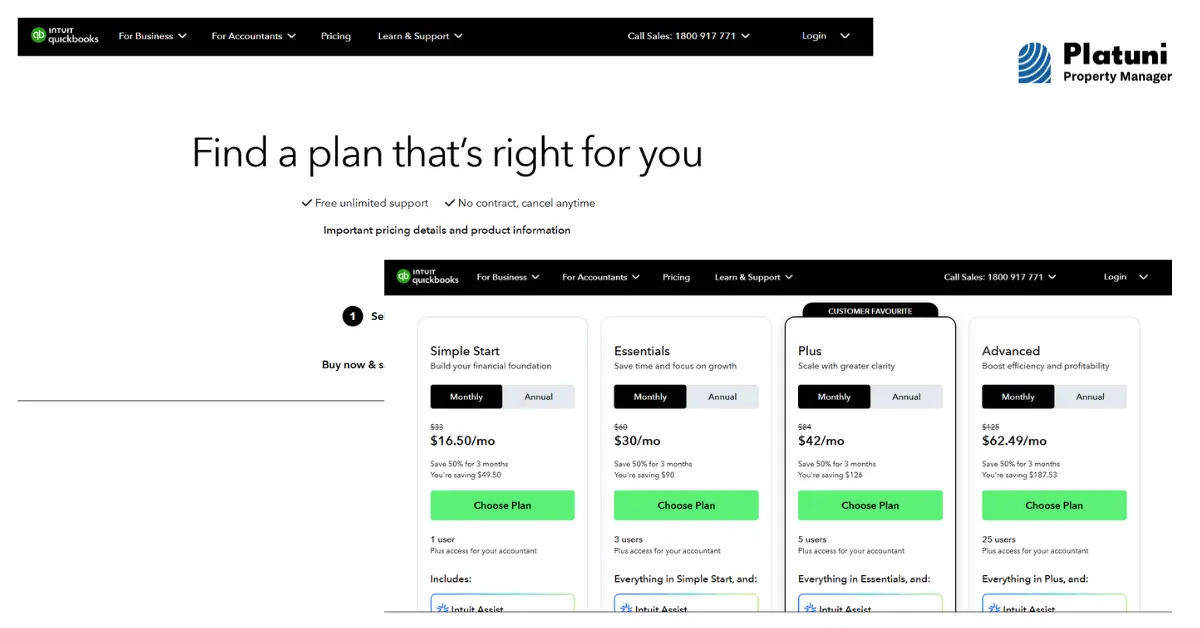
The most suitable QuickBooks product for landlords today is QuickBooks Online, particularly the Plus or Advanced plans, because they support Class and Location tracking essential for allocating transactions by property and generating property-level profitability reports.
2. Establish a Clear Chart of Accounts
Your Chart of Accounts should reflect the types of income and expenses associated with rental properties. Common accounts include:
- Income: Rental income, late fees, application fees
- Expenses: Repairs, maintenance, utilities, property taxes, insurance
- Assets & Liabilities: Security deposits held, property value, escrow accounts
This structure provides clarity on where money is coming from and where it is going and supports accurate reporting.
3. Set Up Classes or Locations
QuickBooks allows tracking by Classes or Locations. Many landlords assign each property or unit a Class or Location so they can:
- Run Profit and Loss by Property reports
- Compare performance across properties
- See cash flow per unit without separate company files
This is especially helpful when you want to see which rental units are profitable and which may need cost control.
4. Integrate Bank and Credit Accounts
Connecting your bank and credit card accounts to QuickBooks automates transaction imports and minimizes manual data entry. This integration helps ensure your books stay up to date and reduces the risk of human error.
Also Read: Using QuickBooks for Rental Property Management
Core QuickBooks Features for Rental Accounting
Income and Expense Tracking
QuickBooks automatically categorizes transactions based on rules you set, helping landlords track rent payments, maintenance costs, utilities, and insurance premiums with precision.
Invoicing and Payment Recording
While QuickBooks doesn’t replace a tenant portal, landlords can:
- Create invoices for rent or fees
- Record rent payments
- Mark late payments and track outstanding balances
This enables accurate accounts receivable tracking even without integrated rent collection.
Financial Reporting and Analysis
One of QuickBooks’ strongest features is its reporting suite. Landlords can generate:
- Profit and Loss statements
- Cash Flow reports
- Balance Sheets
- Expense summaries by category or property
These insights help inform budgeting, planning, and decisions about upgrades or asset sales.
Tax Preparation
QuickBooks simplifies tax time by organizing deductible expenses and generating summaries that can be shared with accountants or exported for filing. Tax-related categories might include repairs, mortgage interest, insurance, and professional fees.
Also Read: Landlord Eviction Services: What to Expect
Limitations Landlords Should Know
While QuickBooks is powerful, it has limitations when used alone for rental property management:
No Built-In Property Management Features
QuickBooks lacks tenant portals, lease tracking, automated rent reminders, built-in maintenance scheduling, and rent roll reporting, all critical for day-to-day rental operations.
Workarounds Can Be Complex
Landlords often have to repurpose features (for example tracking tenants as “customers”) and manually manage rent invoicing and expense allocation, which can be confusing and time-consuming as portfolios grow.
Scalability Challenges
As your rental business expands, setting up every additional property and tracking detailed metrics in QuickBooks can become increasingly unwieldy without integration into a broader property management system.
Best Practices for Landlord QuickBooks Accounting
Adopting best practices improves accuracy, saves time, and strengthens financial control.
1. Keep Personal and Business Accounts Separate
Only use dedicated rental property bank accounts for income and expenses. This ensures clean financial records and simplifies tax reporting.
2. Reconcile Accounts Monthly
Monthly reconciliation helps catch mismatched transactions, errors, or missing entries before they impact your reports.
3. Attach Receipts and Documents
QuickBooks allows you to upload and link receipts to specific transactions. This is invaluable during audits or tax preparation.
4. Review Financial Reports Regularly
Monthly or quarterly reviews of profit and loss, cash flow, and expense trends help you identify issues early, such as rising maintenance costs or underperforming properties.
5. Consider Professional Setup Assistance
If accounting isn’t your strong suit, working with a bookkeeper experienced in rental property QuickBooks setups can save headaches and ensure your system reflects IRS Schedule E reporting needs.
How Platuni Enhances QuickBooks for Landlords
QuickBooks may handle your accounting brilliantly, but it doesn’t manage your entire rental operation. That’s where Platuni helps bridge the gap.
Platuni centralizes tenant records, lease terms, inspection checklists, compliance documentation, and maintenance history, all tied to units and occupants. When paired with QuickBooks:
- Operational data syncs more cleanly with accounting transactions
- Maintenance costs and invoices are easier to categorize correctly
- Tenant billing histories can be referenced alongside QuickBooks’ financial records
- Compliance documentation and tenant communications are stored in one place
This coordinated approach reduces errors and manual data entry, enabling landlords to run financial operations smoothly while maintaining a professional and compliant rental business.
Download the Platuni Property Manager App Today
Conclusion
QuickBooks remains one of the most trusted accounting platforms for landlords who want Clear financial reporting, Professional bookkeeping, Simplified tax preparation, Scalable accounting as their portfolio grows.
However, it is fundamentally an accounting tool, not a full property management system. Landlords who make use of QuickBooks with operational platforms like Platuni gain structured workflows, tenant and lease tracking, and compliance support that QuickBooks alone cannot provide.
By implementing best practices, tailoring your setup to rental needs, and integrating operational tools where needed, QuickBooks becomes a powerful component of your landlord toolkit, which helps in delivering data accuracy, professional recordkeeping, and the insights you need to run your rental business confidently.
Frequently Asked Questions on QuickBooks for Landlords
Is QuickBooks good for landlords?
Yes, QuickBooks offers robust accounting features that help landlords track income, expenses, and profitability, though it lacks built-in property management functions.
Which version of QuickBooks is best for rental property accounting?
QuickBooks Online Plus or Advanced is recommended for landlords because it supports Class and Location tracking, allowing profit and loss reporting by property.
Can QuickBooks replace a property management system?
No, QuickBooks handles accounting well, but rent collection, lease tracking, maintenance scheduling, and tenant communications require dedicated property management software.
How does Platuni work with QuickBooks?
Platuni centralizes operational records (leases, inspections, maintenance history) that complement QuickBooks’ financial data, reducing manual entry and improving accuracy across your rental workflows.
Stay Informed
Subscribe to the Platuni B2B Newsletter to receive industry insights,
new feature announcements, and exclusive growth reports
Related Posts

SEPTEMBER 22, 2026
How to Build a Rental Maintenance Workflow From Request to Completion
Defines what should happen after a maintenance request comes in, logging, prioritizing, assigning, verifying, and documenting the repair through to completion.
Learn more
SEPTEMBER 22, 2026
QuickBooks vs Property Management Software for Rental Properties
Explains why QuickBooks and property management software solve different problems, and when a landlord needs one, the other, or both.
Learn more