
Technology & Automation
Property Maintenance Software: Work Orders, Vendors & What It Costs
by Platuni | 18 Sep, 2026 | 7 mins read
Platuni
18 September, 2026
7 mins read
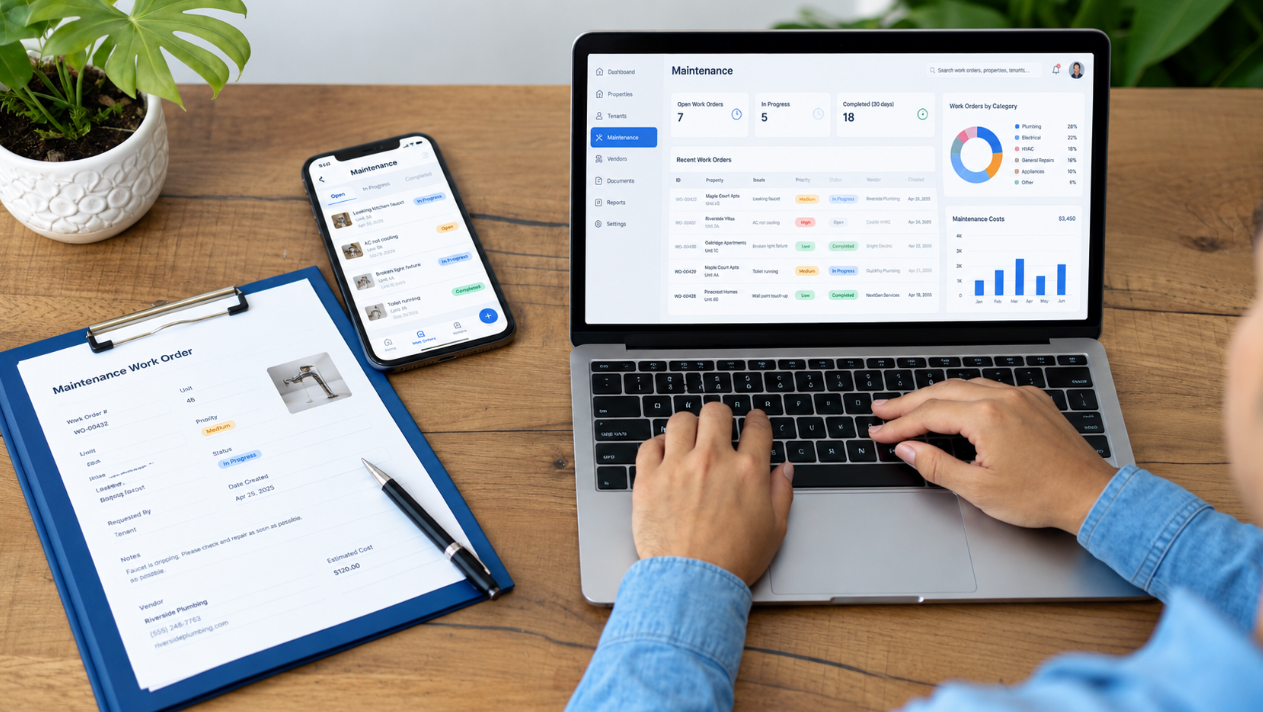
A tenant texts a photo of a leaking faucet at 9pm on a Tuesday. The property manager forwards it to a plumber's cell phone the next morning, then has to call twice to check if anyone showed up, then waits a week for a handwritten invoice to get approved, then has to remember to update the tenant that it's actually done. Multiply that by however many repair requests come in across a portfolio in a given month, and the actual maintenance problem isn't the leaking faucet, it's the five separate manual handoffs between the request and the closed ticket.
This article covers both sides of that handoff. Most property maintenance content is written for the manager alone, but every work order has a vendor on the other end of it, someone quoting, scheduling, doing the job, and waiting to get paid, and the Get Started page's service-provider workspace exists precisely because that side of the workflow matters just as much as the manager's side. What follows is what maintenance software actually needs to do for both, what it costs across three different pricing models, and how Platuni's own maintenance and service-provider workspaces connect.
The Three Maintenance Jobs, and Why They Need Different Workflows
"Maintenance" gets treated as one category, but it's really three distinct jobs with three different rhythms, and software that only handles one well tends to disappoint on the other two.
#1. Reactive Repairs
This is maintenance as most people picture it: something breaks, a tenant reports it, someone fixes it. The workflow that matters here is speed and visibility, a request needs to get in front of the right person immediately, with enough detail (ideally a photo) that a vendor doesn't need to make a separate trip just to diagnose the problem before quoting it. The failure mode for reactive repairs is almost always a communication gap, a request that sits unseen for two days, or a tenant left wondering whether anyone is even aware of the issue.
#2. Preventive Schedules
This is maintenance that happens on a calendar, not in response to a complaint: HVAC filter changes, gutter cleaning, seasonal inspections. The workflow here is fundamentally different from reactive repairs, it needs to trigger automatically on a schedule rather than waiting for someone to notice a problem, and it needs to track whether the scheduled task actually happened, not just that it was assigned. Preventive maintenance done well is largely invisible, since its entire value is preventing the reactive repair that would otherwise have happened.
#3. Turnover / Make-Ready
This is the concentrated burst of work between one tenant moving out and the next moving in: cleaning, repairs, repainting, inspection. The workflow here needs to coordinate multiple tasks and often multiple vendors against a tight deadline, since every day a unit isn't ready is a day of lost rent. Turnover maintenance is where the vacancy-days lever from our NOI guide gets its detail, a slow turnover process is one of the most common preventable sources of extended vacancy.
What Maintenance Software Should Actually Do
Stripped down to the essentials, good maintenance software needs to handle seven things well:
- Resident-submitted requests with photos come first, since a request with a photo attached gets diagnosed and quoted faster than one described in a text message, and it removes an entire round trip where a vendor has to ask "can you send a picture."
- Triage and routing come next, the system needs to determine which requests are urgent versus routine, and route each one to the right person or vendor without a manager manually sorting through a queue every morning.
- Vendor assignment and bids matter especially for larger or non-emergency jobs, where getting more than one quote genuinely produces better pricing, as covered in our NOI guide's maintenance-cost lever.
- Scheduling needs to coordinate the vendor's actual availability with the resident's, since a work order that gets assigned but never gets a confirmed time slot tends to stall.
- Approval thresholds let a manager set a dollar amount below which a vendor can proceed without waiting for sign-off, which matters because requiring approval on every single minor repair creates exactly the kind of bottleneck that turns a two-day fix into a two-week one.
- Cost-per-unit tracking turns individual repair costs into a pattern a manager can actually use, is one unit costing far more in repairs than comparable units, which might indicate a deeper problem worth addressing rather than repeatedly patching.
- And resident status updates close the loop, since a tenant who has to call and ask "is anyone coming" is a sign the system isn't doing its job, regardless of how well the actual repair went.
| Capability | What It Solves | What to Ask a Vendor |
|---|---|---|
| Photo-based requests | Removes the "can you send a picture" round trip | Can residents attach photos directly to a request? |
| Triage and routing | Prevents urgent issues sitting in a general queue | How are urgent vs. routine requests distinguished? |
| Vendor assignment and bids | Produces competitive pricing on larger jobs | Can a request go to multiple vendors for bids? |
| Scheduling | Prevents assigned-but-stalled work orders | Does scheduling confirm a real time slot, not just an assignment? |
| Approval thresholds | Avoids a bottleneck on minor repairs | Can approval limits be set by dollar amount? |
| Cost-per-unit tracking | Surfaces units with recurring, above-average repair costs | Is cost data tracked per unit over time, not just per ticket? |
| Resident status updates | Removes the "is anyone coming" phone call | Are status changes pushed to the resident automatically? |
What a Good Vendor Portal Looks Like, and Why Vendors Ignore Bad Ones
A vendor portal that's an afterthought gets ignored, and when vendors ignore the portal, the manager loses the entire benefit of having software in the first place, everyone falls back to phone calls and text messages, and the system becomes a place where requests start but not where they get tracked to completion.
A vendor portal vendors will actually use has a few specific things. It needs to work on a phone, since a contractor standing in a unit isn't opening a laptop to update a ticket. It needs to let a vendor see the request details and photo before agreeing to the job, not after arriving on site. It needs a fast path to submit a quote or mark a job complete, ideally in under a minute, since anything slower competes with the vendor just calling the property manager directly, which defeats the purpose. And it needs invoicing built in, or at minimum a clear record of what was approved and at what cost, since a vendor who has to chase payment separately from the platform that assigned the work has very little reason to keep using that platform faithfully.
The test worth applying to any maintenance software from the vendor's side: would a busy contractor with six other jobs today actually bother opening this app between visits, or would they just text the property manager instead? If the honest answer is the latter, the manager's side of the software doesn't matter much, because the workflow breaks at the vendor's end regardless of how good the manager's dashboard looks.
Pricing Patterns: Bundled, Standalone CMMS, or Per-Work-Order
Maintenance software pricing splits into three distinct models, and they're not really comparable on price alone since they measure cost differently.
Bundled pricing means maintenance is one feature inside a broader property management platform, priced per unit alongside leasing, payments, and everything else, rather than as its own separate line item. This is how Platuni's maintenance workspace is priced, part of the same per-unit Starter, Growth, or Enterprise plan rather than an add-on.
Standalone CMMS (computerized maintenance management system) software is priced per user, not per unit, and runs considerably higher on a per-seat basis than a bundled per-unit rate. MaintainX, one of the more widely used standalone CMMS platforms, runs roughly $16 to $25 a user per month at its entry tier and $49 to $75 a user per month at its higher tier, with enterprise pricing available on request. Property Meld, a maintenance-coordination platform built specifically for property management rather than general facilities maintenance, starts at $39 a user per month. Across the broader CMMS category, per-user pricing generally runs somewhere between $20 and $99 a month depending on the tier and feature depth.
Per-work-order pricing is the least common of the three, paying per ticket rather than a recurring subscription, more typical of vendor-network services than software platforms, and worth asking about specifically if a vendor's pricing page doesn't mention a subscription at all.
The comparison that actually matters for a property manager: a standalone CMMS priced per user makes sense when maintenance staff vastly outnumber the units they manage, a large facilities team, for instance. Bundled per-unit pricing makes more sense when maintenance is one piece of a broader operation rather than the entire job, which describes most residential property management.
| Pricing Model | How It's Priced | Typical Range | Best Fit |
|---|---|---|---|
| Bundled in PM software | Per unit, part of a broader plan | Included in Platuni's per-unit tiers | Residential property management where maintenance is one part of the job |
| Standalone CMMS | Per user, per month | $16 to $99/user/month depending on tier | Large facilities or maintenance-heavy teams |
| Per-work-order | Per ticket | Varies, less standardized | Vendor-network services rather than software platforms |
How Platuni's Maintenance and Service-Provider Workspaces Connect
Platuni's maintenance workspace, confirmed on its own product page, lets residents and managers log requests in real time with descriptions, photos, and property details attached, which addresses the photo-based-request capability directly. Vendor assignment is AI-driven, the system matches a request to an available vendor or internal staff member based on expertise, location, or availability, rather than a manager manually deciding who to call. Once assigned, vendor progress is tracked in real time, and status updates and notifications happen automatically rather than requiring a manager to manually notify the resident at each stage.
This connects directly to the Get Started page's dedicated service-provider workspace, described there as a place to manage work orders, invoices, and communicate with clients. What's confirmed is that the manager's side and the vendor's side are not two disconnected tools bolted together, the AI-driven assignment step is the mechanism that hands a request from one side to the other.
Approval thresholds and cost-per-unit tracking specifically were not independently confirmed as named Platuni features during this research.
Frequently Asked Questions
What does property maintenance software cost?
It depends entirely on the pricing model. Bundled inside a property management platform, maintenance is included in the per-unit price rather than billed separately. As a standalone CMMS, expect roughly $16 to $99 a user per month depending on the vendor and tier, a materially different cost structure since it scales with staff count rather than unit count.
What's the difference between bundled maintenance features and a standalone CMMS?
Bundled maintenance is priced per unit and included alongside the rest of a property management platform. A standalone CMMS is priced per user and built for maintenance specifically, often with deeper asset-tracking and inventory features than a bundled tool, at a meaningfully higher cost if your maintenance team is large relative to your unit count.
What should student accommodation repairs software do differently?
The core need is the same triage-and-routing workflow described above, but it has to route by bed or room within a shared unit, not just by the unit as a whole, since a repair in a four-bedroom shared house needs to be attributed to the right resident, not the whole household.
Does maintenance software include mobile access for both managers and vendors?
It should, and if it doesn't for the vendor side specifically, that's a strong signal the vendor experience was an afterthought, since a contractor in the field has no practical way to use a desktop-only tool.
What does a vendor actually see when they receive a work order?
At minimum, the request description, any attached photos, the property location, and enough detail to quote or schedule the job without needing to call first to ask basic questions. Anything less pushes the vendor back toward calling the manager directly instead of using the platform.
Is there a separate sign-up for service providers, or do they use the same account as the property manager?
Vendors typically use a distinct service-provider account rather than sharing the property manager's login, since they need visibility into their assigned jobs specifically, not the manager's full portfolio.
Stay Informed
Subscribe to the Platuni B2B Newsletter to receive industry insights,
new feature announcements, and exclusive growth reports
Related Posts
SEPTEMBER 21, 2026
How to Automate Rental Property Management: 10 Tasks Landlords Can Stop Doing Manually
Ten repetitive landlord tasks, rent reminders, payment checks, report building, that automation can take over while judgment calls stay with the landlord.
Learn more
SEPTEMBER 18, 2026
Leasing Automation Software for Property Managers: What It Automates & What It Costs (2026)
Which steps in the leasing workflow are actually worth automating, what that automation costs, and who it isn't worth it for.
Learn more