
Managing access when staff join or leave
by Platuni | 30 Dec, 2025 | 5 mins read
Platuni
30 December, 2025
5 mins read
Access management is an important part of running your property operations smoothly and safely. As people join your team, move into new roles or depart, you must ensure that their permissions match their responsibilities. This protects sensitive information, prevents errors, and keeps your workflows organized.
This guide explains exactly how to manage access during both onboarding and offboarding, with a focus on the steps you must take when someone leaves your organization. These practices help you maintain a secure and well-structured management environment across all properties.
When new staff join your team
When someone joins your organization, your goal is to give them the right access without exposing unnecessary information. Good onboarding also reduces confusion and helps the new team member begin contributing immediately.
Best practices for new staff access
• Assign the correct role based on their responsibilities
• Give access only to the properties they work with
• Confirm that their email and role settings are correct
• Review their permissions after the first week in case adjustments are needed
A strong start reduces mistakes, improves communication, and supports a smooth workflow across the team.
When staff leave your team
When someone leaves your organization, is reassigned or no longer needs access, you must revoke their permissions quickly and cleanly. Delayed or incomplete offboarding can lead to confusion, missing communication or unwanted changes to your system.
Platuni makes it simple to manage this, but following a clear checklist ensures nothing is missed.
Offboarding checklist
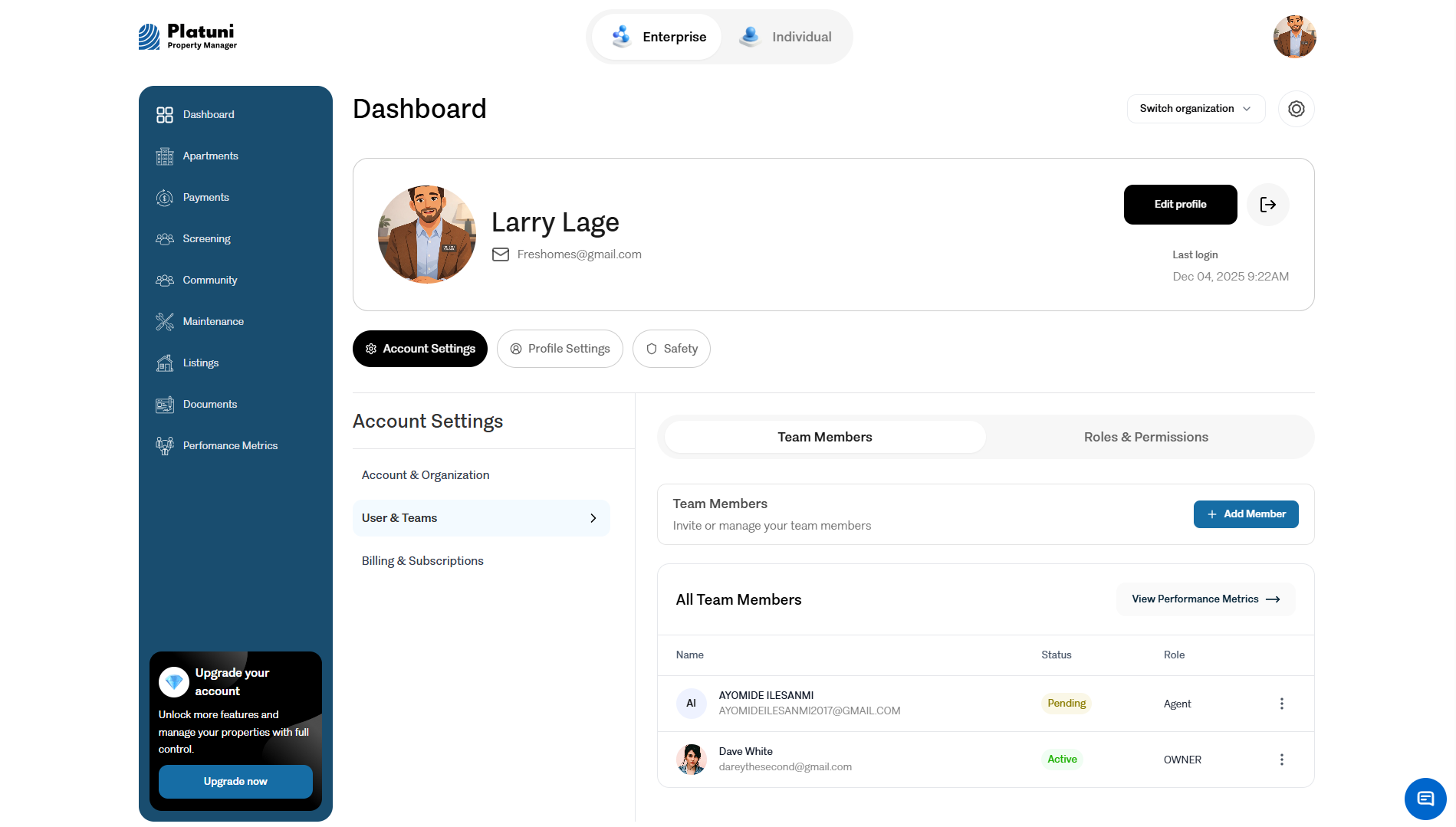
1. Revoke access immediately
The first and most important step is to remove the user’s access to your organization.
How to do this
• Go to the Team section
• Select the employee’s profile
• Choose Remove or Deactivate access
• Confirm the action
Once access is removed, the user can no longer sign in or view your properties, resident data, documents or financial information. This protects your organization from accidental or unauthorized activity after the person leaves.
2. Reassign tasks
Many staff members leave behind open tasks or responsibilities. This may include:
• Unapproved applications
• Pending charges
• Active maintenance assignments
• Lease preparation workflows
• Resident conversations
• Upcoming inspections
• Open financial tasks such as reconciliations or refunds
Before removing a user, or immediately after, review their outstanding tasks to ensure nothing gets lost.
How to reassign tasks
• Visit the Applications, Maintenance, Payments or Documents areas
• Filter by Assigned to
• Reassign the tasks to another active team member
• Note any issues that may need immediate attention
This ensures no resident requests are left unanswered and no operational steps are disrupted.
3. Update notifications
Notifications must go to the correct people. When a team member leaves, their notifications should be moved to the right staff to avoid missed messages or delays.
Areas to update
• Maintenance alerts
• Application stage updates
• Lease signature notifications
• Payment messages
• Building announcements
• Escalation notices for urgent issues
Ensuring your current staff receive all notifications means your operational flow continues without interruption.
Why this process matters
Good access management protects your entire organization. It supports:
• Clear assignment of responsibilities
• Secure handling of financial and resident data
• Smooth communication among staff
• Accurate tracking of activity for audits and accountability
• Prevention of errors that occur when a user retains access after departure
Well managed access ensures your property workflows remain stable even when staff change.
Maintaining a clean access structure
Make it a habit to review access from time to time, especially during moments of growth or change.
Recommended reviews
• Quarterly check of roles across your team
• Review of property assignments after portfolio changes
• Review of notification settings during staffing transitions
This keeps your access structure aligned with your organization’s real workflow.
Stay Informed
Subscribe to the Platuni B2B Newsletter to receive industry insights,
new feature announcements, and exclusive growth reports