
Reviewing applications and assigning them to units
by Platuni | 30 Dec, 2025 | 5 mins read
Platuni
30 December, 2025
5 mins read
Reviewing applications thoroughly ensures a fair, consistent and organized leasing process. Platuni centralizes all applicant information so your team can make clear decisions with confidence.
How to view an applicant’s profile and answers
When you open an application, you can see:
• Personal information
• Employment or income details
• Student or guarantor information (if applicable)
• Lifestyle or matching questions for shared living
• Uploaded documents
• Screening results (once completed)
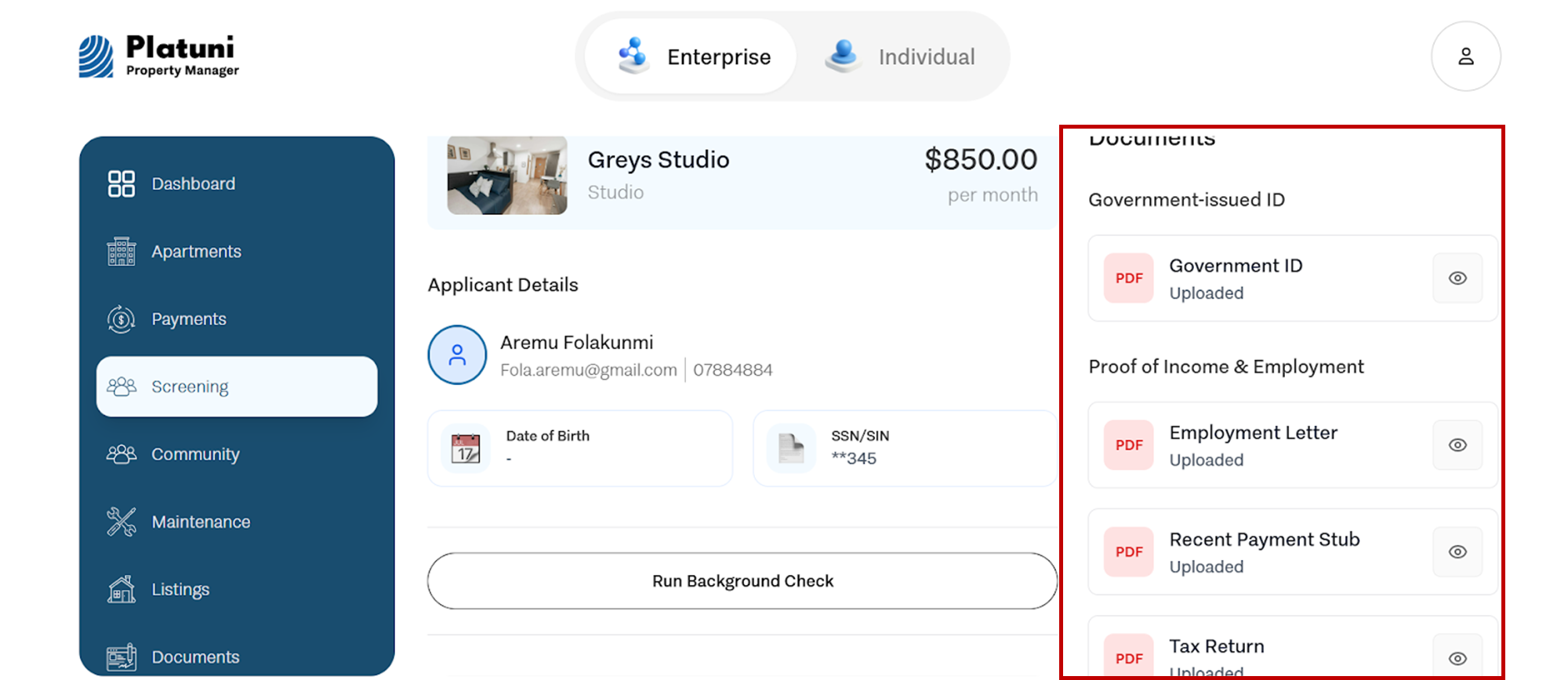
Everything is displayed in a structured, easy to navigate format.
Internal notes and communication logs
Platuni allows your team to record internal notes about each applicant. These notes are visible only to your staff and help track:
• Review decisions
• Questions or concerns
• Follow ups required
• Conversations with the applicant
Use this feature to maintain accountability and ensure that decisions stay consistent across your team.
Linking an application to a specific unit or roommate group
If the applicant has applied generally (for example, in student housing), you can assign them to a specific unit manually.
You can also:
• Link multiple applicants into a roommate group
• Move an application to a different unit if needed
• Track group compatibility for shared living setups
This flexibility helps you manage placements efficiently, especially in buildings with multiple unit types.
Stay Informed
Subscribe to the Platuni B2B Newsletter to receive industry insights,
new feature announcements, and exclusive growth reports